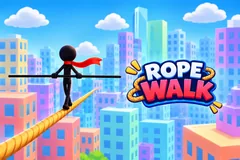
Rope Walk
TikTok LiveTightrope Walking Game
- 16
- Bindable actions
- 6
- Live settings
- 13
- Languages
Gameplay previewTap the speaker for sound
A stickman on a tightrope, and a chat that helps or wrecks him.
Rope Walk puts a stickman with a balance pole and a red scarf on a rope strung between two rooftops, high over a city avenue, and your viewers on both sides of the crossing. He walks and balances on his own, or you walk him yourself with the keyboard. Gusts sway him the whole way, so a quiet chat still has something to watch, and every trigger in chat is a hero that helps him along or a villain that tries to knock him down.
Heroes and villains
Heroes move him forward: a paper plane taps him on, a Windy Cloud blows him along, a Hippo in a tutu belly-flops on the rope and bounces him ahead, a Stork tows him, a tower Crane lifts him on its hook and carries him, and a Blimp drops a rope ladder and flies him all the way to the far roof. Villains send him back: Pigeons land on his pole, a Dodgeball hits him, Cupid sticks an arrow on his head, an inflatable Tube Man slaps him, a Gorilla shakes the rope until he slips, a Rival on a unicycle chest-bumps him, and a helicopter lowers a Cow onto the rope that flings him off. Every sender's name rides with their character.
Save him before he falls
When he slips he hangs from the rope by one hand and a SAVE timer starts. A Save sends a fire ladder up from a truck in the street and a firefighter pushes him back onto the rope, credited to the sender. If nobody saves him in time he drops into the safety net and starts that rope again.
Roof to roof
Reaching the far roof is a win. The viewers who helped him across stand on that roof with their profile pictures and cheer as he lands, then he walks across to the next rope. A +Win sucks him into a black hole that drops him on the far roof, and a -Win sends him back to the start and takes a win away. Play with no goal for as long as you are live, or set a win goal and end on a New Game screen.
Your chat is the controller.
Viewers take part with the gifts and comments they already send in your TikTok Live. Here is how a round of Rope Walk plays out.
- Help him acrossLikes and gifts send heroes that move him along the rope, from a paper plane worth 1 metre to a Crane that carries him 20 and a Blimp that flies him to the far roof.
- Knock him offVillains push him back or make him slip: Pigeons and a Dodgeball nudge him, a Gorilla and a Rival tip him off the rope, and the Cow knocks him straight into the net, even off a crane or blimp ride.
- Save him in timeA slip leaves him hanging by one hand with a SAVE timer running. A Save brings the fire ladder; miss it and he falls and starts the rope again.
- Walk him yourselfSet the walker to Manual to balance with A and D and walk with W or Space, straight from the dashboard, or leave him on Auto to walk and balance on his own while you talk to chat.
Every trigger is yours to rewire.
Bind any action to a gift, comment, like, or follow, and set a minimum gift amount so only real support counts. Chain several triggers to one action, or point the same gift at something different. These are the actions Rope Walk exposes, ready to bind however you run your show.
- Paper PlaneA paper plane with the sender's name taps him 1 metre forward. Every 20 likes by defaultGiftCommentLikeFollow
- Windy CloudA cloud puffs its cheeks and blows him 2 metres along. A Rose by defaultGiftCommentLikeFollow
- HippoA hippo in a tutu belly-flops on the rope and bounces him 5 metres forward. A Finger Heart by defaultGiftCommentLikeFollow
- StorkFlies in ahead of him and tows him 8 metres forward. A Rosa by defaultGiftCommentLikeFollow
- CraneA tower crane lifts him on its hook and carries him 20 metres. A Perfume by defaultGiftCommentLikeFollow
- Fire LadderThe Save: while he hangs, a fire ladder shoots up from a truck and a firefighter pushes him back onto the rope. A Doughnut by defaultGiftCommentLikeFollow
- BlimpDrops a rope ladder and flies him to the far roof, the sender's name on its side. A Cap by defaultGiftCommentLikeFollow
- PigeonLands on one end of his pole and tips him back 1 metre. A follow by defaultGiftCommentLikeFollow
- DodgeballThrown from the far roof, knocks him back 2 metres. A GG by defaultGiftCommentLikeFollow
- CupidShoots a suction-cup arrow onto his head, 2 metres back. A Heart Me by defaultGiftCommentLikeFollow
- Tube ManAn inflatable tube man on a rooftop flops over and slaps him 6 metres back. A Friendship Necklace by defaultGiftCommentLikeFollow
- GorillaClimbs up beside the rope and shakes it until he slips, 10 metres back. A Let 'Em Cook by defaultGiftCommentLikeFollow
- RivalA rival in a sparkly cape rides along the rope on a unicycle and chest-bumps him off his feet, 15 metres back. A Capybara by defaultGiftCommentLikeFollow
- CowA helicopter lowers a cow onto the rope, and the rope flings him off into the net. A Hat and Mustache by defaultGiftCommentLikeFollow
- +WinAdds a win, and a blue black hole drops him on the far roof. A Money Gun by defaultGiftCommentLikeFollow
- -WinTakes a win away, and a violet black hole sends him back to the start of the rope. A Galaxy by defaultGiftCommentLikeFollow
Tune it to your stream.
Rope Walk ships with settings you can change live, no restart. Dial these in from your dashboard while you stream.
- Language
- Thirteen languages for everything on screen
- Walker
- Auto, where he walks and balances on his own, or Manual, where you balance with A and D and walk with W or Space
- City look
- Golden hour, a warm sunset with lit windows, or Toy town, bright noon and pastel blocks
- Rope length
- 40, 80 or 150 metres, so a short rope means more crossings in a live
- Save time
- Five to thirty seconds he hangs from the rope before he falls, 12 by default
- Win goal
- The wins that end the game with a New Game screen, or 0 to keep crossing for the whole live
Common questions about Rope Walk.
How do viewers play Rope Walk?
They send heroes and villains. Out of the box every 20 likes send a paper plane, a follow sends a pigeon, and gifts cover the rest, from a Rose for the Windy Cloud up to a Cap for the Blimp and a Hat and Mustache for the Cow. A Doughnut saves him when he hangs, a Money Gun adds a win and a Galaxy takes one. Every action can be rebound to comments, likes, follows, shares or any gift, each with its own metres.
Do I have to walk him myself?
No. On Auto he walks and balances on his own, which keeps the stream moving while you talk to chat. Switch to Manual to balance and walk him from the dashboard with the keyboard.
What happens when he slips?
He hangs from the rope by one hand and a SAVE timer counts down, 12 seconds by default. A Save pulls him back up. If the timer runs out he falls into the net and starts that rope again, and a villain hitting him while he hangs can drop him sooner.
How does he win?
By reaching the far roof. Every crossing is a win, and the viewers who helped him stand on that roof and cheer. A +Win gift adds a win straight away. With a win goal set, the game ends with a New Game screen when the wins reach it; with no goal he keeps crossing for as long as you are live.
Will Rope Walk run on my PC?
It renders in 3D on the computer running your stream, so give it a reasonably modern machine. Try it in the dashboard preview before you go live.
How do I add Rope Walk to my TikTok Live?
Add one browser source URL to OBS or TikTok LIVE Studio and go live. The game is a 9:16 vertical overlay, and there is no plugin or app to install.
How to add Rope Walk to your TikTok Live
Set up once in your streaming software and go live. No plugin, no viewer install.
- 1Create your accountSign up for Livecade and pick Rope Walk from your dashboard. Set your triggers and settings, or start with the defaults.
- 2Add one browser sourceCopy your overlay URL into a Browser Source in OBS, Streamlabs, or any RTMP tool. That is the only setup step.
- 3Go live and playStart your TikTok Live. Rope Walk reacts to gifts and comments in real time, and your viewers join straight from the chat.
More arcade games
All arcade games
Other games
All games