Car Race
TikTok LiveInteractive game
- 8
- Bindable actions
- 8
- Live settings
- 12
- Languages
Gameplay previewTap the speaker for sound
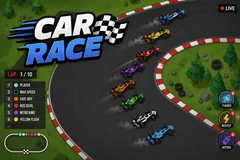
Every viewer drives their own car in a live F1 race.
Car Race puts your whole chat on the same starting grid. A comment is enough to join, and every viewer gets their own Formula car carrying their profile picture, so they can find themselves in the pack at a glance and watch their position climb. A registration window opens between races and extends itself rather than starting an empty grid, so a quiet stream still fills up.
The race runs itself, and keeps churning
Once the lights go out, cars draft, brake, change lanes and fight for position, so the order keeps moving instead of settling into a train after the first corner.
Every gift targets the gifter's own car
Paying visibly buys a shot at winning. The ladder runs from a cheap turbo nudge through a ghost that phases through traffic and a giant mode that dwarfs the field, up to mega and lightning boosts strong enough to pull a car back from the tail of the grid. A gift from someone with no car spawns them straight into the live race.
Hazards stay cheap because they hit everyone
An oil slick spins whoever slides through it, and a weather shift soaks the track and makes the whole field wash wide through the corners. Races loop back to back with a podium and a running tally of the night's champions, and the interface runs in twelve languages.
Your chat is the controller.
Viewers take part with the gifts and comments they already send in your TikTok Live. Here is how a round of Car Race plays out.
- A comment puts you on the gridViewers join free from chat and get their own car carrying their profile picture, so they can spot themselves in the pack. The registration window extends itself rather than starting an empty race, so a quiet stream still fills up.
- Gifts boost your own carEvery boost targets the viewer who sent it, so paying buys a real shot at winning. The ladder runs from a cheap turbo nudge up to mega and lightning, strong enough to drag a car back from the tail of the field.
- Cheap hazards hit everyoneOil slicks and rain cost a fraction of a boost because they are global: a slick spins whoever slides through it, and rain washes the whole field wide through the corners. Chaos anyone in chat can afford.
Every trigger is yours to rewire.
Bind any action to a gift, comment, like, or follow, and set a minimum gift amount so only real support counts. Chain several triggers to one action, or point the same gift at something different. These are the actions Car Race exposes, ready to bind however you run your show.
- Join RacePuts the viewer on the grid with their own car and profile picture. Free from a commentGiftCommentLikeFollow
- Turbo BoostA short burst of speed on the viewer's own car. The entry-level nudgeGiftCommentLikeFollow
- Ghost BoostModest speed, but the car phases straight through traffic instead of fighting itGiftCommentLikeFollow
- Giant ModeBlows the car up to giant size and makes it immune to oilGiftCommentLikeFollow
- Mega BoostA long, powerful boost with a gold aura that genuinely wins racesGiftCommentLikeFollow
- Lightning SpeedThe strongest boost in the game, fast enough to pull a car back from the tail of the fieldGiftCommentLikeFollow
- Oil SlickDrops a slick on the track that spins any car sliding through it. Global, so it hits whoever is unluckyGiftCommentLikeFollow
- Weather ShiftSoaks the track: the whole field slows and washes wide through the cornersGiftCommentLikeFollow
Tune it to your stream.
Car Race ships with settings you can change live, no restart. Dial these in from your dashboard while you stream.
- Interface language
- Twelve languages for the on-screen chrome
- Laps per race
- From a single sprint lap up to an effectively endless endurance race
- Overtaking
- How aggressively the field changes lanes: careful, balanced, or constant overtaking
- Registration window
- How long the grid stays open between races for viewers to join
- Minimum cars to start
- Below this the registration window extends rather than running an empty race
- Maximum cars
- A safety cap on grid size, so a viral moment stays readable
- Results screen
- How long the podium and the night's champions stay up between races
- Show live positions
- A live leaderboard of the top five with their laps
Common questions about Car Race.
How do viewers join Car Race?
A comment is enough. Every viewer who joins gets their own car carrying their profile picture, so they can find themselves in the pack and follow their position. Joining is free, and the registration window extends itself rather than starting an empty grid.
Do viewers need to send gifts to play?
No. Joining and racing are free. Gifts fire boosts on the sender's own car, which is what makes a race worth fighting over and drives gifting while it runs. A gift from someone with no car spawns them straight into the live race.
Can a gift actually win someone the race?
Yes, and that is the point. The boosts are priced by strength, so a mega or lightning boost is powerful enough to pull a car back from the tail of the field. The natural speed spread between cars is deliberately kept below the cheapest boost so a free car can never out-run a paid one.
What do the oil slick and rain do?
They are global hazards, so they hit the whole field rather than one viewer, which is why they cost a fraction of a boost. A slick spins any car that slides through it, and rain slows everyone and washes cars wide through the corners.
How do I add Car Race to my TikTok Live?
Add one browser source URL to OBS or your streaming software and go live. There is no plugin to install and nothing for your viewers to download.
How to add Car Race to your TikTok Live
Set up once in your streaming software and go live. No plugin, no viewer install.
- 1Create your accountSign up for Livecade and pick Car Race from your dashboard. Set your triggers and settings, or start with the defaults.
- 2Add one browser sourceCopy your overlay URL into a Browser Source in OBS, Streamlabs, or any RTMP tool. That is the only setup step.
- 3Go live and playStart your TikTok Live. Car Race reacts to gifts and comments in real time, and your viewers join straight from the chat.



Other games
All games





















































