Trivia Time
TikTok LiveTrivia Quiz Game
- 2
- Bindable actions
- 12
- Live settings
- 13
- Languages
Gameplay previewTap the speaker for sound
A chat trivia quiz you can leave running while you talk.
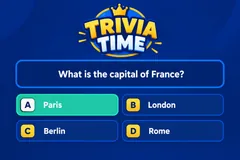
Trivia Time puts a question and four answers on screen and lets your whole chat vote by typing a single letter. There is no ladder to climb, no category to pick and nothing to explain, so a viewer who arrives mid-stream has missed nothing.
Built to be talked over
A round is about twenty seconds from question to answer, and the next one starts on its own. Nothing waits on you, so the game runs in the background of a chatty stream instead of turning it into a show you have to host. The question can be read aloud, and a full-screen 3-2-1 counts down the last three seconds before the reveal.
Your questions, your look
The bank ships with over 110,000 questions across thirteen languages, more than 8,000 in each, and it is yours to edit: change any question, hide the ones that do not suit your room, or write your own. Card colors, accent and background are configurable, the seven sound effects can be swapped for your own, and the music bed comes from your music deck.
Your chat is the controller.
Viewers take part with the gifts and comments they already send in your TikTok Live. Here is how a round of Trivia Time plays out.
- Vote with one letterA question and four answers go up. Viewers type A, B, C or D in chat to vote, and their avatars appear as the votes land.
- Fastest answers score mostCorrect voters score, with bonus points for answering early. Vote counts stay hidden until the reveal so nobody follows the crowd.
- It never stops for youThe answer reveals, the scoreboard updates and the next question starts on a timer. There is no ladder state and no round that can stall.
Every trigger is yours to rewire.
Bind any action to a gift, comment, like, or follow, and set a minimum gift amount so only real support counts. Chain several triggers to one action, or point the same gift at something different. These are the actions Trivia Time exposes, ready to bind however you run your show.
- Remove a Wrong AnswerStrikes out one of the three wrong options, so the room is voting on threeGiftCommentLikeFollow
- Skip the QuestionThrows out the current question and moves straight to the next oneGiftCommentLikeFollow
Tune it to your stream.
Trivia Time ships with settings you can change live, no restart. Dial these in from your dashboard while you stream.
- Language
- Thirteen languages for the question bank and on-screen text
- Your question bank
- Edit, hide or add your own questions in any language
- Round timing
- Seconds to answer, seconds on the answer, and the gap between questions
- Scoring
- Points for a correct answer, and a bonus for answering fast
- Vote counts
- Show how many voted for each answer, revealed only with the answer
- Scoreboard
- Show the top scorers under the voters, and how many entries
- Big 3-2-1 countdown
- A full-screen countdown over the last three seconds
- Read the question aloud
- Text-to-speech narration of the question, in your stream voice
- Your sounds
- Swap any of the seven sound effects for your own audio
- Appearance
- Question card, answer card, accent and text colors
- Background
- Transparent, a solid color, or your own image, with optional floating particles
- Who can play
- Everyone, followers only, or your fans club only. Applies to comments and gifts
Common questions about Trivia Time.
How do viewers play Trivia Time?
A question and four answers appear on screen. Viewers type A, B, C or D in your TikTok Live chat to vote, and their avatars appear as votes land. Correct voters score, and the fastest score most.
Do viewers need to send gifts to play?
No. Voting is free and comment-driven. Gifts can remove a wrong answer or skip a question, which is what drives gifting during a round.
How is Trivia Time different from Million Quiz?
Million Quiz is a Who Wants to Be a Millionaire style ladder with difficulty tiers and lifelines, hosted like a show. Trivia Time is flat and endless: every round is the same shape, rounds take about twenty seconds, and nothing waits for you, so it suits a stream you talk over.
Can I use my own questions?
Yes. The bank holds over 110,000 questions across thirteen languages, more than 8,000 in each, and you can edit any of them, hide the ones that do not suit your room, or write your own.
How do I add Trivia Time to my TikTok Live?
Add one browser source URL to OBS or your streaming software and go live. There is no plugin to install and nothing for your viewers to download.
How to add Trivia Time to your TikTok Live
Set up once in your streaming software and go live. No plugin, no viewer install.
- 1Create your accountSign up for Livecade and pick Trivia Time from your dashboard. Set your triggers and settings, or start with the defaults.
- 2Add one browser sourceCopy your overlay URL into a Browser Source in OBS, Streamlabs, or any RTMP tool. That is the only setup step.
- 3Go live and playStart your TikTok Live. Trivia Time reacts to gifts and comments in real time, and your viewers join straight from the chat.
More trivia & quiz games
All trivia games








Other games
All games















































