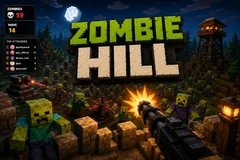
Zombie Hill
TikTok LiveInteractive game
- 9
- Bindable actions
- 6
- Live settings
- 12
- Languages
Gameplay previewTap the speaker for sound
Your whole chat is the horde climbing the hill.
Zombie Hill puts you on a hilltop with a mounted gun and turns your entire chat into the horde climbing up at you. Every viewer who joins, comments, likes, follows or shares spawns a zombie wearing their username on a nameplate, so people watch the field for their own name.
The gun aims itself, so you keep talking
It tracks and drops them on its own, alternating between picking off individual targets and raking the front rank, so you never have to aim and can keep talking to chat while the hill fills up.
Gifts cut both ways
The attack ladder runs from cheap swarms of walkers, crawlers and bats up through runners, armoured helmets and dogs, then special units with real abilities, bone-throwers that attack at range, screamers that speed up the whole horde, shielded mages that summon minions, and finally a boss tier of giants and twenty-strong skeleton swarms. But chat can also help you survive: a medkit, a ten-second overdrive, a shield, a freeze that slows every zombie on the field, or permanent defenses like an auto turret, a tesla tower, a spinning blade or barbed wire.
Kills bank score and rank you up
Thirteen military ranks from Private to General, a kill feed naming who sent each zombie you dropped, and a top-attackers board ranking the viewers doing the most damage. Let a zombie reach the sandbags and it costs your base health. Four difficulty presets, a configurable horde cap, and twelve languages.
Your chat is the controller.
Viewers take part with the gifts and comments they already send in your TikTok Live. Here is how a round of Zombie Hill plays out.
- Every viewer becomes a zombieJoining, commenting, liking, following or sharing spawns a zombie wearing that viewer's username on a nameplate, so people watch the hill for their own name in the crowd.
- The gun aims itselfYour mounted gun tracks and drops zombies on its own, alternating between picking off individual targets and raking the front rank. You never have to aim, so you can keep talking to chat while the hill fills up.
- Gifts attack you, or save youThe gift ladder runs from cheap swarms up to giants and twenty-strong skeleton hordes. But chat can also send medkits, overdrive, shields and freezes, or build turrets, tesla towers, blades and barbed wire that fight for you.
Every trigger is yours to rewire.
Bind any action to a gift, comment, like, or follow, and set a minimum gift amount so only real support counts. Chain several triggers to one action, or point the same gift at something different. These are the actions Zombie Hill exposes, ready to bind however you run your show.
- Spawn enemyper zombie typeSends a zombie wearing the viewer's name up the hill. The type and how many are both configurable per triggerGiftCommentLikeFollow
- MedkitHeals your base health so a bad wave does not end the runGiftCommentLikeFollow
- OverdriveTen seconds of rapid fire to clear a horde that got too closeGiftCommentLikeFollow
- ShieldTen seconds of heavily reduced damage to your baseGiftCommentLikeFollow
- FreezeSlows every zombie on the field for eight secondsGiftCommentLikeFollow
- Auto turretBuilds a permanent turret that fires on its own and cannot be attackedGiftCommentLikeFollow
- Tesla towerBuilds a tower that chains lightning between zombies and cannot be attackedGiftCommentLikeFollow
- Spinning bladeBuilds a melee blade that shreds anything close, but zombies can destroy itGiftCommentLikeFollow
- Barbed wireBlocks and scrapes zombies as they try to climb past itGiftCommentLikeFollow
Tune it to your stream.
Zombie Hill ships with settings you can change live, no restart. Dial these in from your dashboard while you stream.
- Interface language
- Twelve languages for the on-screen chrome
- Difficulty
- Easy, Normal, Hard or Insane. Sets enemy speed, toughness and your fire rate together, while each zombie type keeps its own character
- Base health
- How much your base takes before the run ends
- Max zombies on screen
- Caps the live horde so a big raid cannot outrun your hardware
- Show top attackers
- Ranks viewers by how many zombies they sent that you killed
- Practice zombies when quiet
- Keeps a small horde climbing when no viewer is attacking, so the hill never sits empty
Common questions about Zombie Hill.
How do viewers join Zombie Hill?
Joining, commenting, liking, following or sharing all spawn a zombie wearing that viewer's username, so anyone watching takes part for free. Every trigger is rebindable to your own thresholds.
Do I have to aim and shoot?
No. The gun tracks and drops zombies on its own, alternating between picking off individual targets and raking the front rank, so you can keep talking to chat while it fights. Your job is surviving the horde your viewers send.
Do viewers need to send gifts to play?
No. Free actions like joining, commenting and liking already put a viewer in the horde. Gifts decide what arrives, from cheap swarms up to giants, and can also send medkits, shields and permanent defenses that help you survive.
Can my chat help me instead of attacking?
Yes. Gifts can send a medkit, a ten-second overdrive, a shield, or a freeze that slows the whole field, and can build permanent defenses: an auto turret, a tesla tower, a spinning blade, or barbed wire. Defense kills credit the viewer who paid for the turret.
How do I add Zombie Hill to my TikTok Live?
Add one browser source URL to OBS or your streaming software and go live. There is no plugin to install and nothing for your viewers to download.
How to add Zombie Hill to your TikTok Live
Set up once in your streaming software and go live. No plugin, no viewer install.
- 1Create your accountSign up for Livecade and pick Zombie Hill from your dashboard. Set your triggers and settings, or start with the defaults.
- 2Add one browser sourceCopy your overlay URL into a Browser Source in OBS, Streamlabs, or any RTMP tool. That is the only setup step.
- 3Go live and playStart your TikTok Live. Zombie Hill reacts to gifts and comments in real time, and your viewers join straight from the chat.
More arcade games
All arcade games










Other games
All games













































