Run Party
TikTok LiveInteractive game
- 11
- Bindable actions
- 7
- Live settings
- 13
- Languages
Gameplay previewTap the speaker for sound
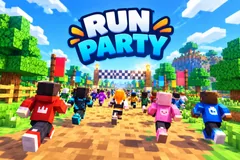
Your chat races to the finish on your TikTok Live, in their own Minecraft skins.
Run Party turns your TikTok Live into a foot race. Everyone who comments lines up on the start grid as a blocky runner, up to 100 of them, and after 3, 2, 1 the whole crowd runs the track to the finish arch. Name tags carry each viewer's profile photo, and a live ranking, a minimap and the metres to go keep the race easy to follow on a phone.
Race in your own Minecraft skin
A viewer who comments mc followed by their Minecraft username runs in that player's skin. Everyone else gets one of nearly 1,500 built-in skins, a different one for each runner in a race. A line on screen tells viewers the command while the race fills, and you can switch viewers' own skins off at any time.
Gifts change the race
Out of the box a Rose gives a boost, a Finger Heart a turbo dash, a Rosa a jetpack, a Perfume a kart, a Doughnut a motorbike and a Hand Heart a rocket that strikes cannot touch. A Money Gun makes the runner a giant for ten seconds. A Hat and Mustache strikes the top 3 with lightning and a Galaxy sends a storm over the top 10, and a strike never hits the viewer who sent it. Any other gift gives a boost, longer for bigger gifts, and 20 likes or a follow give a short sprint. Gifts sent before the start are saved and go off at GO.
A camera that follows the gifts
The camera flies to the runner of whoever sent a power-up, or to the first runner a strike hits, and a card shows the sender's photo and name. In between, the race films its own start, leader and finish shots. Every race starts on a fresh grid and ends on a podium for the top 3, and Tonight's champions counts each viewer's wins across the stream. From the dashboard you can start the race now, restart it, skip to the next map or reset the wins.
Your chat is the controller.
Viewers take part with the gifts and comments they already send in your TikTok Live. Here is how a round of Run Party plays out.
- A comment puts you on the gridAny comment joins the race, up to 100 runners. Joining stays open for 20 seconds by default, then 3, 2, 1, GO. On a small stream CPU runners fill the grid up to 8, marked CPU, and never take a win.
- Power-ups for your own runnerA boost, a turbo dash, a jetpack, a kart, a motorbike, a rocket or giant size goes to the sender's own runner, and a repeat makes it last longer. A gift from a viewer who is not running puts them in the race.
- Strikes stop the leadersLightning stuns the top 3 for 2.5 seconds and a storm the top 10 for five, and both knock runners off their rides. A strike never hits its sender, and a runner on a rocket is safe from it.
- Podium and championsThe first runner across the line wins. The top 3 stand on the podium, Tonight's champions counts the wins across your stream, and a fresh grid opens for the next race.
Every trigger is yours to rewire.
Bind any action to a gift, comment, like, or follow, and set a minimum gift amount so only real support counts. Chain several triggers to one action, or point the same gift at something different. These are the actions Run Party exposes, ready to bind however you run your show.
- Join the racePuts the viewer on the start grid. Mid-race they wait for the next one. Any comment does it by defaultGiftCommentLikeFollow
- SprintA little extra pace for 1.5 seconds. 20 likes or a follow by defaultGiftCommentLikeFollow
- BoostTwo seconds of extra speed. Any gift without a trigger of its own gives one, longer for bigger giftsGiftCommentLikeFollow
- TurboA dash at three times the pace for about half a secondGiftCommentLikeFollow
- JetpackThe runner rides a jetpack for nearly three secondsGiftCommentLikeFollow
- KartThe runner drives a kart for nearly four secondsGiftCommentLikeFollow
- MotorbikeA faster ride on a motorbike for three and a half secondsGiftCommentLikeFollow
- RocketThe fastest ride, four seconds on a rocket. Strikes cannot touch the runner on itGiftCommentLikeFollow
- GiantThe runner grows giant and runs at double pace for ten secondsGiftCommentLikeFollow
- LightningStuns the top 3 runners for 2.5 seconds. Never hits the senderGiftCommentLikeFollow
- StormStuns the top 10 runners for five seconds. Never hits the senderGiftCommentLikeFollow
Tune it to your stream.
Run Party ships with settings you can change live, no restart. Dial these in from your dashboard while you stream.
- Language
- Thirteen languages for everything on screen
- Map
- Meadow, Desert, Snow or Sky Islands, or a new map every race (the default)
- Race length
- Short, medium or long: about 1, 2 or 3 minutes without gifts. Power-ups make a race with gifts end sooner
- Time to join
- 10 to 60 seconds before the countdown, 20 by default
- CPU runners
- Fills a small race up to 8 runners, from 0 to 8, marked CPU on screen. They never count as a win
- Camera follows gifts
- The camera flies to whoever sent a power-up, or to the first runner a strike hits
- Own skins
- Let viewers race in their own Minecraft skin, and show the command on screen
Common questions about Run Party.
How do viewers join Run Party?
By commenting. Out of the box any comment puts the viewer on the start grid, and a gift from a viewer who is not running puts them in the race too. You can change the join trigger to a keyword, likes, follows, shares or a gift.
How do viewers race in their own Minecraft skin?
They comment mc followed by their Minecraft Java Edition username. Run Party fetches that player's public skin and puts it on their runner within a few seconds. You can turn own skins off in the settings, which puts everyone back in the built-in skins at once.
Is Run Party an official Minecraft game?
No. Run Party is a Livecade game and is not affiliated with or endorsed by Mojang or Microsoft. It shows the public skin of the Minecraft username a viewer types, and everyone else runs in Livecade's own built-in skins.
What do gifts do?
Out of the box a Rose gives a boost, a Finger Heart a turbo dash, a Rosa a jetpack, a Perfume a kart, a Doughnut a motorbike, a Hand Heart a rocket and a Money Gun giant size. A Hat and Mustache strikes the top 3 with lightning and a Galaxy sends a storm over the top 10. Any other gift gives a boost. Every action can be rebound to any gift, or to comments, likes, follows and shares.
Can a strike hit the viewer who sent it?
No. A strike hits the leaders still running, skips its sender and anyone on a rocket, and takes the next runner down the order instead.
Does Run Party work on a small stream?
Yes. With few viewers, CPU runners fill the grid up to 8 runners, marked CPU on screen. They never count as a win, and you can set them from 0 to 8.
Will Run Party run on my PC?
It renders in 3D on the computer running your stream, so give it a reasonably modern machine. Try it in the dashboard preview before you go live.
How do I add Run Party to my TikTok Live?
Add one browser source URL to OBS or TikTok LIVE Studio and go live. The game is a 9:16 vertical overlay, and there is no plugin or app to install.
How to add Run Party to your TikTok Live
Set up once in your streaming software and go live. No plugin, no viewer install.
- 1Create your accountSign up for Livecade and pick Run Party from your dashboard. Set your triggers and settings, or start with the defaults.
- 2Add one browser sourceCopy your overlay URL into a Browser Source in OBS, Streamlabs, or any RTMP tool. That is the only setup step.
- 3Go live and playStart your TikTok Live. Run Party reacts to gifts and comments in real time, and your viewers join straight from the chat.
More racing games
All racing games



Other games
All games