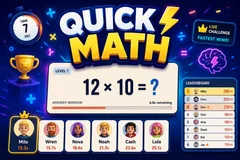
Quick Math
TikTok LiveMath Quiz Game
- 1
- Bindable action
- 8
- Live settings
- 13
- Languages
Gameplay previewTap the speaker for sound
A live mental-math race where everyone who gets it right scores.
Quick Math puts one sum on screen and lets your entire audience race it. There is no cap on who can score: everyone who answers correctly banks points and keeps their streak, ranked by how fast they got there. Only the timer ends a question, so a viewer who is still reading is never cut off by five faster people finishing first.
The questions are generated live
Nothing is drawn from a fixed pack, so the game never runs out and a recent sum is never served again. Sums are built at the moment they are needed, and because the question is just numbers and an operator it reads the same in every language. Addition, subtraction, multiplication and division all appear, and every answer is a whole number.
Difficulty means difficulty
The setting you choose is what the game serves, from the first question to the last. Easy is small sums, mostly two numbers. Normal is times tables and three-number lines. Hard needs the order of operations: brackets, percentages and the first squares and roots. Brutal is where about half the questions are fractions, powers or roots. For big rooms, Mixed keeps Normal as the base and deals in Hard and Brutal questions, each tagged on screen and worth more points. Nothing adapts behind your back and nothing waters itself down because the chat is doing well.
Every solver gets seen
While the clock is running the fastest solvers scroll past with their times, so a big crowd is a visible wave of names rather than a number. When the answer is revealed it settles onto the quickest few, and a session leaderboard keeps the running totals so the same regulars have something to defend.
Your chat is the controller.
Viewers take part with the gifts and comments they already send in your TikTok Live. Here is how a round of Quick Math plays out.
- Everyone correct scoresNo cap on solvers per question. Points scale with how fast the answer came in, and a correct answer never breaks a streak, so the whole room can play the same sum at once.
- Sums generated on the spotBuilt at runtime rather than pulled from a pack. All four operations appear, answers are always whole numbers, and a recent question is never served again.
- A difficulty that stays putFour settings, from two-number sums up to fractions, powers and roots, plus a Mixed mode for big rooms that is mostly Normal with Hard and Brutal questions dealt in. What you pick is what your chat gets all stream, with no hidden ramp quietly making it easier.
Every trigger is yours to rewire.
Bind any action to a gift, comment, like, or follow, and set a minimum gift amount so only real support counts. Chain several triggers to one action, or point the same gift at something different. These are the actions Quick Math exposes, ready to bind however you run your show.
- Add more timeExtends the clock on the question currently on screenGiftCommentLikeFollow
Tune it to your stream.
Quick Math ships with settings you can change live, no restart. Dial these in from your dashboard while you stream.
- Interface language
- Thirteen languages for the on-screen chrome; the sums need none
- Seconds per question
- How long the answer window stays open
- Difficulty
- Easy, Normal, Hard, Brutal or Mixed, fixed for the whole stream
- Fastest solvers shown
- How many names sit on the podium when the answer lands
- Points leaderboard
- Show or hide the running session totals, and how many places it lists
- Answer streaks
- Show the multiplier badge viewers build by answering right repeatedly
- Celebration effects
- How much confetti a correct answer throws
- Who can play
- Everyone, followers only, or your fans club only. Applies to comments and gifts
Common questions about Quick Math.
How do viewers answer?
They type the number in chat. Nothing to install and no command to remember: just the answer on its own. Arabic-Indic, Devanagari and full-width digits all count, and so does an answer written with a comma or a space in it, so a viewer typing on any keyboard is scored the same.
Does only the first correct answer count?
No. Everyone who answers correctly scores, ranked by speed, and the question runs until the timer ends it. A cap on winners meant a busy chat filled every slot in under a second, which punished slow typers rather than wrong ones.
Where do the questions come from?
They are generated live rather than read from a pack, so the game never runs out and a recent question is never served again. Every answer is a whole number, and all four operations show up. At the harder settings they combine into one line, with brackets where the order matters, and a few answers dip below zero, so viewers can type a minus sign.
How hard does it actually get?
Brutal is built from questions that take real maths rather than quick arithmetic: dividing by a fraction, squares and cubes against roots, percentages and bracketed lines, like 7 ÷ 1/7 + 3 or 6² - root 196. The answers stay short enough to type fast, usually under 500. The difficulty you pick is fixed: it does not quietly ease off when your chat starts solving, so a setting labelled hard stays hard for the whole stream.
What if my chat has every skill level in it?
Pick Mixed. Out of every 20 questions, 11 are Normal, 6 are Hard and 3 are Brutal, and two Brutal questions never come back to back. Hard and Brutal ones are tagged on screen, get extra time and are worth more points, so the fast solvers have something to chase without losing the rest of the room.
Do viewers get only one guess?
One answer per viewer per question, so nobody can spray numbers until one lands. A wrong answer ends that viewer streak; a correct one never does, even if it arrives late.
How do I add Quick Math to my TikTok Live?
Add one browser source URL to OBS or your streaming software and go live. There is no plugin to install and nothing for your viewers to download.
How to add Quick Math to your TikTok Live
Set up once in your streaming software and go live. No plugin, no viewer install.
- 1Create your accountSign up for Livecade and pick Quick Math from your dashboard. Set your triggers and settings, or start with the defaults.
- 2Add one browser sourceCopy your overlay URL into a Browser Source in OBS, Streamlabs, or any RTMP tool. That is the only setup step.
- 3Go live and playStart your TikTok Live. Quick Math reacts to gifts and comments in real time, and your viewers join straight from the chat.
More trivia & quiz games
All trivia games








Other games
All games















































