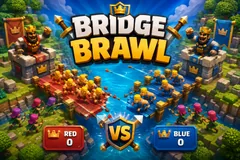
Bridge Brawl
TikTok LiveInteractive game
- 7
- Bindable actions
- 7
- Live settings
- 12
- Languages
Gameplay previewTap the speaker for sound
A Clash Royale style arena battle where your chat sends the troops.
Bridge Brawl is a Clash Royale style tower battle built for TikTok Live, with one difference that changes everything: nobody plays it with a deck. Your viewers are the deck. Red holds the top of the arena, blue holds the bottom, and every troop that walks a lane got there because someone in chat sent the gift bound to it. You are not playing against your audience, you are hosting the war between them.
Seven troops, each on its own gift
Barbarians, archers, a baby dragon, a wizard, a mini pekka, a valkyrie and a giant, each bound to whichever gift you choose and each with real stats behind it. Ground troops walk their lane and fight whatever they meet; the baby dragon flies straight over the melee, so only archers, wizards and the towers themselves can bring it down. A viewer picking a dragon over a barbarian is making an actual tactical call, not just choosing a picture.
Crowns, kings and a clock
Each side defends two crown towers and a king. Take a crown tower and you bank a crown; take the king and the match ends on the spot. The king does not fire until one of its own crown towers has fallen, which turns the last stretch of every match into a real last stand. When the clock runs out the side with more crowns wins, and a tie falls to whoever did more tower damage, so a losing side that chipped away all match still has something to show for it.
It never sits empty
An auto-fill trickle keeps a minimum number of troops on the board when the room is quiet, so a viewer arriving mid-match finds a battle already running rather than an empty field, and it backs off the moment real gifts start landing. Matches run as long as you set them and restart on their own, so the arena is always mid-fight when someone new walks in.
Your chat is the controller.
Viewers take part with the gifts and comments they already send in your TikTok Live. Here is how a round of Bridge Brawl plays out.
- Every troop is a gift someone sentSeven troops, each bound to whichever gift, like, follow or share you choose. Set how many a single trigger sends, so one gift can drop a lone giant or a wave of barbarians.
- Air beats ground, archers beat airThe baby dragon flies over the whole ground army and only archers, wizards and towers can touch it. Ground troops fight what is in front of them. Counters actually matter, so chat learns what to send.
- Three crowns ends itTwo crown towers and a king per side. The king stays silent until one of its crown towers falls, then wakes up for the last stand. Drop the king and the match ends immediately.
Every trigger is yours to rewire.
Bind any action to a gift, comment, like, or follow, and set a minimum gift amount so only real support counts. Chain several triggers to one action, or point the same gift at something different. These are the actions Bridge Brawl exposes, ready to bind however you run your show.
- BarbarianA squad of five melee fighters, the cheap way to flood a laneGiftCommentLikeFollow
- ArcherA pair of ranged attackers that can shoot air units downGiftCommentLikeFollow
- Baby dragonFlies over the ground war and only ranged troops can stop itGiftCommentLikeFollow
- WizardSplash damage that clears a packed lane in one shotGiftCommentLikeFollow
- Mini pekkaFast, fragile and hits hard, the tower breakerGiftCommentLikeFollow
- ValkyrieTanky melee that holds a bridge against a crowdGiftCommentLikeFollow
- GiantSlow, huge health pool, walks through fire toward the towersGiftCommentLikeFollow
Tune it to your stream.
Bridge Brawl ships with settings you can change live, no restart. Dial these in from your dashboard while you stream.
- Interface language
- Twelve languages for the on-screen chrome
- Side names
- Rename Red and Blue to whatever rivalry you are running
- Match length
- One to sixty minutes per match, plus the pause before the next one
- Tower health and firepower
- Tune how long a tower survives and how hard it hits back
- Unit speed
- Speed the whole battle up or slow it down
- Maximum troops per side
- How crowded the arena is allowed to get
- Keep the battle going on its own
- A trickle of free troops when the room is quiet, off the moment real gifts land
Common questions about Bridge Brawl.
Is Bridge Brawl like Clash Royale?
It is built in the same shape: two lanes, two bridges, crown towers, a king tower and a three crown win. The difference is who plays it. There is no deck and no elixir, because the troops come from your viewers sending gifts, so the whole audience is playing one side instead of one person playing a hand.
How do viewers send troops?
Every troop is bound to a trigger you choose, usually a gift, and can also be a like streak, a follow or a share. Send the gift, the troop walks out of your side of the arena with the sender credited on screen. You set how many troops one trigger sends.
How does a side win?
Take both crown towers and the king, or hold more crowns than the other side when the clock runs out. A tie on crowns falls to whichever side did more tower damage, so a side that spent the match chipping away is never empty handed.
What happens when nobody is gifting?
An auto-fill trickle keeps a minimum number of troops fighting so the arena is never an empty field, and it stops as soon as real gifts start arriving. Matches also restart on their own, so someone arriving mid stream always finds a battle in progress.
How do I add Bridge Brawl to my TikTok Live?
Add one browser source URL to OBS or your streaming software and go live. There is no plugin to install and nothing for your viewers to download.
How to add Bridge Brawl to your TikTok Live
Set up once in your streaming software and go live. No plugin, no viewer install.
- 1Create your accountSign up for Livecade and pick Bridge Brawl from your dashboard. Set your triggers and settings, or start with the defaults.
- 2Add one browser sourceCopy your overlay URL into a Browser Source in OBS, Streamlabs, or any RTMP tool. That is the only setup step.
- 3Go live and playStart your TikTok Live. Bridge Brawl reacts to gifts and comments in real time, and your viewers join straight from the chat.
More fighting & battle games
All fighting games






Other games
All games

















































