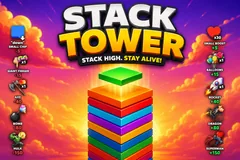
Stack Tower
TikTok LiveInteractive game
- 8
- Bindable actions
- 6
- Live settings
- 12
- Languages
Gameplay previewTap the speaker for sound
Stack the tower sky-high while your chat builds it and knocks it down.
Stack Tower is the classic stacking game turned into a live co-op battle with your chat. A block slides across the top and drops onto the tower: line it up for a clean stack, miss and the overhang shaves off. You can stack it yourself by clicking, or let it stack on auto while the whole game becomes about what your viewers do.
Chat builds it up or tears it down
Boost gifts pile blocks on fast, from a small heart to balloons, a rocket, a dragon and a mega Superman that lifts a huge stack at once, each one crediting the viewer who sent it with their face and name. Sabotage gifts crumble it back down, from a giant finger and axe up to a bomb and a screen-shaking Hulk.
The sky tells you how it is going
As the tower climbs it changes with it, day to sunset to space to the cosmos, and if the sabotage wins it sinks underground toward the abyss. It tracks your all-time best and fires a NEW RECORD celebration when you beat it, or you can set a custom goal to chase.
Your chat is the controller.
Viewers take part with the gifts and comments they already send in your TikTok Live. Here is how a round of Stack Tower plays out.
- Stack it cleanA block slides across the top and drops. Line it up for a perfect stack that keeps the tower wide, or miss and the overhang shaves off. Stack it yourself by clicking, or let it run on auto.
- Gifts build and sabotageBoost gifts pile blocks on fast, from balloons to a rocket, a dragon, and a mega Superman. Sabotage gifts crumble it back down, from a giant finger and axe to a bomb and a screen-shaking Hulk. Every hero effect credits the viewer who sent it.
- Climb the sky, chase the recordAs the tower grows the sky climbs from day to the cosmos, and sabotage can sink it underground toward the abyss. It tracks your all-time best and celebrates a NEW RECORD, or chase a custom goal you set.
Every trigger is yours to rewire.
Bind any action to a gift, comment, like, or follow, and set a minimum gift amount so only real support counts. Chain several triggers to one action, or point the same gift at something different. These are the actions Stack Tower exposes, ready to bind however you run your show.
- Small Boost (+5)Adds a few blocks to the towerGiftCommentLikeFollow
- Balloons (+15)Floats a batch of blocks up onto the towerGiftCommentLikeFollow
- Rocket (+40)Blasts a stack of blocks on, crediting the senderGiftCommentLikeFollow
- Dragon (+80)Swoops in and drops a big stack with a screen shakeGiftCommentLikeFollow
- Superman (+150)A mega boost that lifts a huge stack at onceGiftCommentLikeFollow
- Small Chip (-5)Knocks a couple of blocks off the topGiftCommentLikeFollow
- Giant Finger (-15) / Axe (-40)Flicks or chops blocks off the towerGiftCommentLikeFollow
- Bomb (-80) / Hulk (-150)Detonates or smashes a big chunk of the tower downGiftCommentLikeFollow
Tune it to your stream.
Stack Tower ships with settings you can change live, no restart. Dial these in from your dashboard while you stream.
- Interface language
- Twelve languages for the on-screen chrome
- Stacking mode
- Stack it yourself by clicking, or let it stack on auto
- Auto stack tempo
- How fast the tower builds itself in auto mode
- Background changes with height
- The sky climbs from day to the cosmos, or sinks to the abyss
- Deepest the pit can go
- Caps how far sabotage can sink the tower underground
- Record banner
- Track your all-time best, or set a custom goal to chase
Common questions about Stack Tower.
How do viewers interact with Stack Tower?
Viewers send gifts to build the tower or knock it down, and each boost credits the sender with their face and name. Likes and comments can be bound to the free boost and chip too, so any audience size can join in.
Do I stack the tower or does it stack itself?
Both are options. In manual mode you click to drop each block, so it is a skill game. In auto mode the tower stacks itself and the whole game becomes about what your viewers build and sabotage.
What do the gifts do?
Boost gifts add blocks, from a small heart and balloons up to a rocket, a dragon, and a mega Superman. Sabotage gifts crumble the tower, from a giant finger and axe to a bomb and a Hulk. Every action is rebindable to the gift you want.
How do I add Stack Tower to my TikTok Live?
Add one browser source URL to OBS or your streaming software and go live. There is no plugin to install and nothing for your viewers to download.
How to add Stack Tower to your TikTok Live
Set up once in your streaming software and go live. No plugin, no viewer install.
- 1Create your accountSign up for Livecade and pick Stack Tower from your dashboard. Set your triggers and settings, or start with the defaults.
- 2Add one browser sourceCopy your overlay URL into a Browser Source in OBS, Streamlabs, or any RTMP tool. That is the only setup step.
- 3Go live and playStart your TikTok Live. Stack Tower reacts to gifts and comments in real time, and your viewers join straight from the chat.
More arcade games
All arcade games










Other games
All games













































