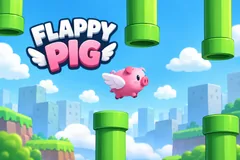
Flappy Pig 3D
TikTok LiveInteractive game
- 8
- Bindable actions
- 4
- Live settings
- 12
- Languages
Gameplay previewTap the speaker for sound
One pig, one endless course, and a chat that cannot agree which way it should go.
Flappy Pig 3D puts a single pig on an endless course of pipes and hands the distance to your audience. Nobody has to play and nobody can lose it for everyone: the pig holds its own line through the pipes, and what your viewers control is the one number on screen, which is how far it has flown. They control it in both directions.
Four props push, four props pull
The action list is a ladder read twice. An apple, a drone, a pegasus and a dragon carry the pig forward; a gun, a fan, a train and a black hole drag it back. Each side runs from a small nudge to a run-defining swing, and the two sides sit in their own columns on the overlay with their numbers colour-coded, so a viewer can see which half of the room they are joining without reading a word.
Every distance is yours to set
Nothing in the ladder is fixed. Each prop carries a distance you choose, on whichever gift, like, share or comment trigger you point it at, so the same eight props can be a gentle push-and-pull or a game where one gift undoes an hour. The only rule the game enforces is the shape: four of them add distance and four take it away.
The blimp carries the biggest gifter
A blimp crosses the sky every so often with the top gifter of the session on the side of it, their picture and their coin total painted onto the banner. It changes hands the moment somebody outspends them. Before anyone has gifted it carries the Livecade mark instead, so the sky is never blank.
Your chat is the controller.
Viewers take part with the gifts and comments they already send in your TikTok Live. Here is how a round of Flappy Pig 3D plays out.
- The pig flies itselfIt holds its own line through the pipes with no input from anyone, so there is nothing to learn and no way to play it badly. You can switch to manual and tap to flap yourself if you would rather fly it.
- Distance is the whole scoreOne number, counted in pipes flown, running for the whole session. Every action moves that number, forward or back, by an amount the sender can see on the overlay before they send it.
- Eight props, two directionsApple, drone, pegasus and dragon carry the pig forward. Gun, fan, train and black hole pull it back. Each one flies in and does the thing its number on the overlay says it will.
- You set every distanceThe distance each prop moves and the trigger it sits on are both yours. Point them at gifts, likes, shares or a chat keyword, so free viewers can move the pig in both directions too if you want them to.
Every trigger is yours to rewire.
Bind any action to a gift, comment, like, or follow, and set a minimum gift amount so only real support counts. Chain several triggers to one action, or point the same gift at something different. These are the actions Flappy Pig 3D exposes, ready to bind however you run your show.
- AppleCarries the pig forward by the distance you setGiftCommentLikeFollow
- DroneTows the pig forward by the distance you setGiftCommentLikeFollow
- PegasusFlies the pig forward by the distance you setGiftCommentLikeFollow
- DragonCarries the pig forward, the showiest prop on the forward sideGiftCommentLikeFollow
- GunShoots the pig back by the distance you setGiftCommentLikeFollow
- FanBlows the pig backwards by the distance you setGiftCommentLikeFollow
- TrainKnocks the pig back by the distance you setGiftCommentLikeFollow
- Black holeDrags the pig back, the showiest prop on the sabotage sideGiftCommentLikeFollow
Tune it to your stream.
Flappy Pig 3D ships with settings you can change live, no restart. Dial these in from your dashboard while you stream.
- Interface language
- Twelve languages for the on-screen chrome
- Flight mode
- Auto, where the pig flies itself, or manual, where you tap to flap
- Record banner
- Show your all-time best distance, or a target you set yourself
- Distance to reach
- The goal the banner counts toward when you are running a target
Common questions about Flappy Pig 3D.
How do viewers interact with Flappy Pig 3D?
They trigger props that move the pig. Four props carry it forward and four drag it back, and you decide what sets each one off and how far it moves. Point them at gifts, likes, shares or a chat keyword, in any mix.
Do viewers fly the pig?
No, and that is deliberate. The pig holds its own line through the pipes, so there is no skill gate and no way for one person to ruin a run. What your audience decides is how far it gets, not how it flies.
What happens when the pig hits a pipe?
It tumbles and recovers, and the distance keeps counting from where it was. A knock costs momentum rather than ending a run, so there is no restart for everybody and no dead stretch while a new round sets up.
Can viewers undo each other?
Yes, that is the game. Set the two sides to matching distances and the biggest push and the biggest pull cancel exactly; weight one side heavier and you decide whether the room is fighting uphill or down. The number on screen is whatever chat has argued its way to.
What is the blimp?
It carries the biggest gifter of the session, with their picture and coin total on the banner, and it changes hands as soon as somebody outspends them. Before anyone has gifted it carries the Livecade mark.
Can I fly it myself?
Yes. Switch the flight mode to manual and you tap to flap, with your viewers still pushing and pulling the distance around you. On auto the pig flies itself and never needs you at all.
How do I add Flappy Pig 3D to my TikTok Live?
Add one browser source URL to OBS or your streaming software and go live. There is no plugin to install and nothing for your viewers to download.
How to add Flappy Pig 3D to your TikTok Live
Set up once in your streaming software and go live. No plugin, no viewer install.
- 1Create your accountSign up for Livecade and pick Flappy Pig 3D from your dashboard. Set your triggers and settings, or start with the defaults.
- 2Add one browser sourceCopy your overlay URL into a Browser Source in OBS, Streamlabs, or any RTMP tool. That is the only setup step.
- 3Go live and playStart your TikTok Live. Flappy Pig 3D reacts to gifts and comments in real time, and your viewers join straight from the chat.
More games
All games










































