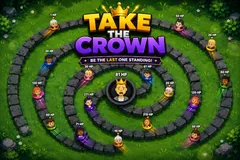
Take the Crown
TikTok LiveInteractive game
- 2
- Bindable actions
- 3
- Live settings
Gameplay previewTap the speaker for sound
One throne, one very long line, and a crown that changes hands every few seconds.
One viewer sits on the throne and your whole chat forms a queue to take it off them. Viewers join free, appear at the mouth of a spiral corridor with their profile picture and HP over their head, and walk toward the centre. The corridor holds 164 of them shoulder to shoulder.
The crown changes hands on one subtraction
When the viewer at the front arrives, the fight is pure subtraction. The two HP totals cancel and whoever had more survives carrying the difference, so an 11 HP king challenged by a 50 HP viewer loses the crown and the challenger sits down on 39. Equal totals knock both out and leave the seat empty for whoever arrives next.
HP never resets, so spending compounds
HP never resets while a viewer is alive, so someone who arrived on 1 HP can be worth thousands an hour later. HP sent to the viewer already on the throne raises the throne itself, so your biggest supporter can be defended instead of just waiting to be knocked off, and HP sent to someone already knocked out puts them back at the end of the line rather than doing nothing.
Your chat is the controller.
Viewers take part with the gifts and comments they already send in your TikTok Live. Here is how a round of Take the Crown plays out.
- The fight is one subtractionThe head of the line and the king cancel their HP against each other. The bigger number survives carrying the difference and the smaller one leaves the game, so a 50 HP viewer beats an 11 HP king and takes the throne on 39. Equal totals kill both and leave the seat open.
- HP carries over and never resetsNothing is spent and nothing decays while a viewer is alive, so the throne is won by whoever accumulated the most. A viewer who joined on 1 HP can be worth thousands later, and topping up the current king raises the throne itself.
- The king thins the line himselfAbout once a second the king throws a guard wearing his own profile picture out along the corridor. Each one absorbs a single HP from the first viewer it meets and is spent, which costs the king nothing and clears out the 1 HP crowd before it arrives.
Every trigger is yours to rewire.
Bind any action to a gift, comment, like, or follow, and set a minimum gift amount so only real support counts. Chain several triggers to one action, or point the same gift at something different. These are the actions Take the Crown exposes, ready to bind however you run your show.
- Join the linePuts the viewer at the mouth of the corridor with their starting HP and their profile picture, and they walk in from there. Free, and bound to viewers entering the live by default so the line fills on its ownGiftCommentLikeFollow
- Add HPAdds HP to the viewer who triggered it. In the line it tops them up where they stand, on the king it raises the throne, and on someone dead or new it spawns them at the back with that HP. Every trigger row carries its own amount and its own label, so one action covers a whole ladder of giftsGiftCommentLikeFollow
Tune it to your stream.
Take the Crown ships with settings you can change live, no restart. Dial these in from your dashboard while you stream.
- Camera
- Wide keeps the entire line on screen, close makes everyone bigger and lets the camera tour the corridor, still holds a fixed frame with no drift
- Line speed
- How fast the queue walks, from a slow shuffle to a sprint. Sets how often the throne is challenged
- Starting HP on join
- What a free joiner is worth when they enter the line, from 1 to 100
Common questions about Take the Crown.
How do viewers play Take the Crown?
They join the line and walk toward the throne at the centre. When they reach it their HP is subtracted against the king's, and whoever has more survives with the difference and holds the crown. By default anyone entering the live is put in the line automatically, so viewers are playing before they do anything.
How does a viewer win a fight?
By having more HP than the king at the moment they arrive. The two totals cancel and the survivor keeps what is left over, so an 11 HP king who is challenged by a 50 HP viewer loses the throne and the challenger sits on 39. If both have exactly the same HP they knock each other out and the throne is empty for whoever comes next.
What happens when a viewer loses?
They are out of the game. Sending them HP puts them back at the end of the line with that HP, so a viewer is never locked out and a gift sent to someone already knocked out still does something visible.
Can the person on the throne be protected?
Yes. HP sent to the current king is added to the throne, so a viewer holding the crown can be reinforced by other people rather than just waiting to be knocked off. The king also throws out guards on his own, one about every second, and each absorbs one HP from the first challenger it meets.
How many viewers fit in the line?
The corridor holds 164 standing side by side, which is the real limit rather than a number we picked. If it is completely full a free join is skipped, but HP sent by a viewer who could not be seated is held and applied the moment a place opens, so a gift is never lost to a full line.
What can I bind gifts to?
There are two actions: joining the line and adding HP. Add HP carries its own amount on each trigger row, so one action covers an entire ladder, for example a follow worth 50, every 100 likes worth 10, and three gifts worth 10, 300 and 1000. That ladder ships already set up and every row is yours to change.
How do I add Take the Crown to my TikTok Live?
Add one browser source URL to OBS or your streaming software and go live. There is no plugin to install and nothing for your viewers to download.
How to add Take the Crown to your TikTok Live
Set up once in your streaming software and go live. No plugin, no viewer install.
- 1Create your accountSign up for Livecade and pick Take the Crown from your dashboard. Set your triggers and settings, or start with the defaults.
- 2Add one browser sourceCopy your overlay URL into a Browser Source in OBS, Streamlabs, or any RTMP tool. That is the only setup step.
- 3Go live and playStart your TikTok Live. Take the Crown reacts to gifts and comments in real time, and your viewers join straight from the chat.
More fighting & battle games
All fighting games






Other games
All games

















































