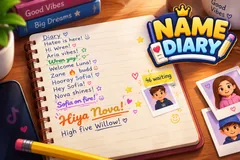
Name Diary
TikTok LiveName Writing Game
- 7
- Bindable actions
- 4
- Live settings
- 13
- Languages
Gameplay previewTap the speaker for sound
A pencil writes your viewers' names in a diary on your stream, live.
Name Diary fills your stream with a lined notebook page on a wooden desk in 3D, and a yellow pencil writes your viewers into it. A viewer follows or comments and joins the line. When their turn comes, the pencil writes their TikTok name letter by letter with one short word beside it, like "Hiya Mia!" or "Dash legend!", then draws a line under or over it. Seventeen lines fill a page. Then the page is torn out and slides off the desk, and the pencil writes the heading on the fresh page underneath.
A fancier line for every gift
Out of the box a Rose writes the same pencil line ahead of the free line, a Finger Heart adds a red heart doodle, a Rosa a long swash and a doodle, a Perfume writes the name in coloured ink, and a Doughnut in a script hand with a row of hearts. A Hand Heart swaps the pencil for a gold fountain pen: the name in big gold script, colour emoji stickers pressed on beside it and the viewer's profile picture dropped onto the page as a polaroid. A Money Gun gets a page of their own, with "Dear" and their name as the heading, a doodled border, their polaroid and stickers in the corners.
Every name as it was written
Names go on the page the way viewers wrote them: emoji in colour, fancy letters and symbols, Arabic from right to left, Hindi, Cyrillic and Vietnamese. A viewer never has two free lines on the same page, so one regular cannot fill it, and a name that holds one of your mute words is written with a friendly word in its place.
Every gift writes
A gift with no trigger of its own still writes by its value: every 500 TikTok coins a page of their own, every 100 a gold pen line, every 30 a script line, and below that coloured ink, a swash, a heart or a plain line, up to 20 lines, 3 gold pen lines and 1 page from one send. Turn that setting off and only the gifts you bound write.
Your chat is the controller.
Viewers take part with the gifts and comments they already send in your TikTok Live. Here is how a round of Name Diary plays out.
- Follow or comment, get a lineA follow or any comment puts a viewer in the line, and the pencil writes their name in the diary with one short word beside it.
- Gifts skip the lineA gift writes ahead of the free line, from a Rose's pencil line to a Money Gun's page of their own, and every rung looks different.
- A page at a timeSeventeen lines fill a page, then it is torn out and a fresh page takes its place. A viewer never has two free lines on the same page.
- Speeds up when busyA plain line takes about three seconds at normal speed, and the pencil writes faster by itself when many viewers are waiting.
Every trigger is yours to rewire.
Bind any action to a gift, comment, like, or follow, and set a minimum gift amount so only real support counts. Chain several triggers to one action, or point the same gift at something different. These are the actions Name Diary exposes, ready to bind however you run your show.
- Write a lineThe viewer's name in pencil with one word beside it. From a follow or comment it joins the free line, from a gift it skips itGiftCommentLikeFollow
- Heart doodleThe pencil line with a red heart drawn after itGiftCommentLikeFollow
- Swash nameA long swash under the name and a small doodleGiftCommentLikeFollow
- Coloured inkThe name in coloured ink with a swashGiftCommentLikeFollow
- Script nameThe name in a script hand and coloured ink, with a row of heartsGiftCommentLikeFollow
- Gold penThe pencil is swapped for a gold fountain pen: big gold script, emoji stickers and the viewer's photo dropped on the pageGiftCommentLikeFollow
- Own pageA page of their own: "Dear" and their name at the top, a doodled border, their photo and stickersGiftCommentLikeFollow
Tune it to your stream.
Name Diary ships with settings you can change live, no restart. Dial these in from your dashboard while you stream.
- Language
- Thirteen languages for the words beside each name, the page heading, the queue and the trigger labels
- Page title
- Your own heading for every page, or "Diary" in the game's language
- Writing speed
- Slow, normal or fast. The pencil also speeds up by itself when many viewers are waiting
- Unbound gifts write by coin value
- A gift with no trigger of its own still writes: every 500 TikTok coins a page of their own, every 100 a gold pen line, every 30 a script line, and less writes ink, a swash, a heart or a plain line
Common questions about Name Diary.
How do viewers get their name in Name Diary?
Out of the box a follow or any comment puts them in the line for a pencil line. Every trigger can be rebound, so likes, shares or any gift can be the way in instead.
What is written beside a name?
One short, friendly word in the game's language, before or after the name, such as "Hiya Mia!" or "Dash legend!". The same word is never used twice on one page.
What do gifts do?
A gift writes ahead of everyone waiting for a free line. By default a Rose writes a pencil line, a Finger Heart adds a heart doodle, a Rosa a swash, a Perfume coloured ink, a Doughnut a script name, a Hand Heart a gold pen line with stickers and the viewer's photo, and a Money Gun a page of their own. Every gift with a trigger writes, streaks included, and a gift with no trigger of its own writes by its coin value.
Can a viewer be written more than once?
Yes. A viewer has one free line waiting at a time and never gets two free lines on the same page, so they can come back on a later page. Gift lines are written every time.
Does it keep up with a big stream?
The free line holds up to 200 viewers and gifts always go to the front. The pencil writes faster on its own when eight or more viewers are waiting.
Will Name Diary run on my PC?
It renders in 3D on the computer running your stream, so give it a reasonably modern machine. Try it in the dashboard preview before you go live.
How do I add Name Diary to my TikTok Live?
Add one browser source URL to OBS or your streaming software and go live. There is no plugin to install and nothing for your viewers to download.
How to add Name Diary to your TikTok Live
Set up once in your streaming software and go live. No plugin, no viewer install.
- 1Create your accountSign up for Livecade and pick Name Diary from your dashboard. Set your triggers and settings, or start with the defaults.
- 2Add one browser sourceCopy your overlay URL into a Browser Source in OBS, Streamlabs, or any RTMP tool. That is the only setup step.
- 3Go live and playStart your TikTok Live. Name Diary reacts to gifts and comments in real time, and your viewers join straight from the chat.
More party games
All party games














Other games
All games









































