Battle Arena
TikTok LiveInteractive game
- 4
- Bindable actions
- 13
- Live settings
- 12
- Languages
Gameplay previewTap the speaker for sound
Two teams of viewers auto-brawl in a live arena.
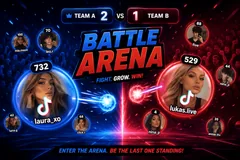
Battle Arena splits your chat into two teams and turns every viewer into a fighter. Type to join a side, then send gifts to spawn, grow HP, or unleash a barrage on the enemy team. Fighters charge the front line and auto-battle in real time, and every boost shows: the blob grows, a +HP pops over it, and big gifts get a shout-out banner.
Gifts load a queue of heavy weapons
They fire one at a time: a shotgun blast, then a rocket, then maybe a full nuke. Hold the gift button and the barrage grows into a run of back-to-back explosions.
Run it your way
Best-of rounds with first-to-kills, elimination, timed or push-the-line win modes. The front line leans toward whichever team is winning, and if only one side has players, a boss holds the other so a single viewer still has a fight.
Your chat is the controller.
Viewers take part with the gifts and comments they already send in your TikTok Live. Here is how a round of Battle Arena plays out.
- Pick a side and spawnViewers join Team A or Team B and a fighter carrying their profile picture drops into the arena to auto-battle the other side.
- Gifts arm your fighterGifts pump HP or load a barrage of random heavy weapons that your fighter unloads on the enemy team one shot at a time. Every gift is a lottery, and even a small one can roll a nuke.
- Win the round your wayRun first-to-kills, elimination, timed, push the line, or endless sandbox, best of N rounds. A live board tracks the top players the whole time.
- Never a one-sided arenaWhen a team has nobody on it, a boss sized to the other team holds that side. Beat it for a triple kill, and it comes back stronger.
Every trigger is yours to rewire.
Bind any action to a gift, comment, like, or follow, and set a minimum gift amount so only real support counts. Chain several triggers to one action, or point the same gift at something different. These are the actions Battle Arena exposes, ready to bind however you run your show.
- Join a sideper teamAdds the viewer as a fighter flying their profile picture on that teamGiftCommentLikeFollow
- Grow my blob (HP)Pumps HP into the sender's own fighter so it survives longer. Set an HP amount per trigger, like a Rose worth 100GiftCommentLikeFollow
- Attack a whole teamper teamThe sender's fighter unloads a barrage of random weapons on that team, one shot at a time. Bigger gift bursts mean longer barrages, and any shot can roll a rocket, cannonball, or nukeGiftCommentLikeFollow
- Attack the other teamThe same barrage, aimed at whichever team the sender is not onGiftCommentLikeFollow
Tune it to your stream.
Battle Arena ships with settings you can change live, no restart. Dial these in from your dashboard while you stream.
- Interface language
- Twelve languages for the on-screen chrome
- Team names, colors, and backgrounds
- Brand each side with its own name, color, and image
- Win mode
- First-to-kills, elimination, timed, push the line, or endless sandbox
- Rounds and kills to win
- Best-of rounds and how many kills take a round
- Round time limit
- Cap on how long a round can run
- Fighter speed
- Calm, normal, or fast movement
- Max fighters per side
- How crowded each team can get
- HP per grow
- How much HP each grow action adds
- Practice fighters
- Auto-added bots when few viewers are playing so the arena stays lively
- Boss
- A boss holds a side nobody has joined, so a lone viewer always has a fight
- Sudden death and screen shake
- Overtime tie-breaks and heavy-weapon impact shake
- Leaderboard
- Show a live top-players board, and how many entries
- Background
- Transparent, a solid color, or your own image
Common questions about Battle Arena.
How do viewers join Battle Arena?
Viewers pick a side from your TikTok Live chat and spawn a fighter flying their own profile picture. Both teams fill up as more people join, and if only one side has players, a boss holds the other, so any audience size works.
Do viewers need to send gifts to play?
No. Joining a team is free and comment-driven. Gifts grow a fighter's HP or fire barrages of random weapons at the enemy team, which is what drives gifting during a match.
Can I change which triggers do what?
Yes. Every action is rebindable to a gift, comment, like, follow, share, or a viewer entering the live, with a minimum gift amount if you want one, so you decide exactly what spawns fighters, grows HP, or fires an attack.
How do I add Battle Arena to my TikTok Live?
Add one browser source URL to OBS or your streaming software and go live. There is no plugin to install and nothing for your viewers to download.
How to add Battle Arena to your TikTok Live
Set up once in your streaming software and go live. No plugin, no viewer install.
- 1Create your accountSign up for Livecade and pick Battle Arena from your dashboard. Set your triggers and settings, or start with the defaults.
- 2Add one browser sourceCopy your overlay URL into a Browser Source in OBS, Streamlabs, or any RTMP tool. That is the only setup step.
- 3Go live and playStart your TikTok Live. Battle Arena reacts to gifts and comments in real time, and your viewers join straight from the chat.
More party games
All party games














Other games
All games









































