Roast Your Photo
TikTok LiveInteractive game
- 2
- Bindable actions
- 9
- Live settings
- 13
- Languages
Gameplay previewTap the speaker for sound
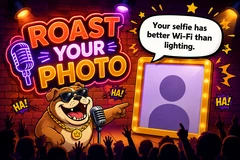
A bulldog comedian roasts your viewers, one profile picture at a time.
Roast Your Photo puts a stand-up bulldog on a comedy club stage and feeds him your audience. A viewer comments to join the queue, their profile picture goes up on the display panel, and the bulldog studies it, delivers a roast out loud, and slams down a cooking-doneness stamp: still raw, well done, charred. The queue strip shows who is next, so viewers can see themselves coming and stay for their turn.
Gifting is the fast lane
A gift joins the queue and jumps ahead of everyone waiting, ordered by coin value, so several gifters sort themselves out by price with no configuration. Rose is bound out of the box, which means skipping the line is discoverable from the first minute rather than a hidden feature. Every trigger is rebindable, so a follow, a share, a like streak, or any gift you choose can be the way in.
Over 11,000 roasts, in three intensities
Roughly 900 for every one of thirteen languages, written natively rather than machine-translated, running from gentle to spicy. Mixed draws from all three so a stream varies in bite instead of holding one note for an hour, and nothing repeats until your pool runs down, tracked per creator.
The bank is yours to rewrite
Write your own roasts, rewrite any line you would say differently, hide the ones that do not fit your channel, and the game serves your version. The roast is spoken aloud in the same voice as the rest of your stream, and the whole show, backdrop, spotlight color, club sign and audience density, is yours to set.
Your chat is the controller.
Viewers take part with the gifts and comments they already send in your TikTok Live. Here is how a round of Roast Your Photo plays out.
- Viewers queue up from chatA comment puts a viewer in line and their profile picture on the stage. The queue strip shows who is next, so viewers can see themselves coming and stay for their turn.
- Gifts skip the lineA gift joins the queue and jumps ahead of everyone waiting, ordered by coin value, so several gifters sort themselves out by price. Gifting again while already in line moves you further up rather than adding you twice.
- The bank is yours to editOver 11,000 roasts ship in thirteen languages across three intensities. Write your own, rewrite any line, or hide the ones that do not suit your channel, and the game serves your version.
Every trigger is yours to rewire.
Bind any action to a gift, comment, like, or follow, and set a minimum gift amount so only real support counts. Chain several triggers to one action, or point the same gift at something different. These are the actions Roast Your Photo exposes, ready to bind however you run your show.
- Roast MeJoins the queue to get roasted, at the back of the lineGiftCommentLikeFollow
- Skip the LineJoins the queue AND jumps ahead, ordered by how much the gift is worthGiftCommentLikeFollow
Tune it to your stream.
Roast Your Photo ships with settings you can change live, no restart. Dial these in from your dashboard while you stream.
- Language
- Twelve languages for the roasts and the on-screen chrome
- Your roast bank
- Add your own roasts, rewrite any line, or hide the ones you dislike
- Roast intensity
- Gentle, medium, spicy, or mixed to draw from all three
- Pause between roasts
- How long the stage rests before the next viewer is pulled up
- Read roasts aloud
- Text to speech in the same voice as the rest of your stream
- Queue avatars shown
- Up to thirty faces in the up-next strip, with a counter for the rest
- Spotlight color and audience
- Tune the stage light and how packed the crowd looks
- Club sign and backdrop
- Swap in your own sign art or background image
- Who can play
- Everyone, followers only, or your fans club only. Applies to comments and gifts
Common questions about Roast Your Photo.
How do viewers get roasted in Roast Your Photo?
They comment to join the queue, and their profile picture goes up on stage when their turn comes. Every trigger is rebindable, so you can make a gift, a follow, a share, or a like streak the way in instead.
What do gifts do?
A gift joins the queue and skips ahead of everyone already waiting, ordered by coin value, so the pricier gift takes the earlier slot. Rose is bound by default, so viewers discover the fast lane without you configuring anything.
Can I write my own roasts?
Yes. The game ships with over 11,000 roasts across thirteen languages, and you can add your own, rewrite any line you would say differently, or hide the ones that do not fit your channel. The game serves your version.
Does it roast how people look?
No. The roasts go after taste, judgement and the decision to post the photo, never someone's appearance, body, age or identity. Lines are written to land on any profile picture, sight unseen.
Are the roasts actually spoken out loud?
Yes, with text to speech, in the same voice as the rest of your stream. You can also turn narration off and let the speech bubble carry the joke.
How do I add Roast Your Photo to my TikTok Live?
Add one browser source URL to OBS or your streaming software and go live. There is no plugin to install and nothing for your viewers to download.
How to add Roast Your Photo to your TikTok Live
Set up once in your streaming software and go live. No plugin, no viewer install.
- 1Create your accountSign up for Livecade and pick Roast Your Photo from your dashboard. Set your triggers and settings, or start with the defaults.
- 2Add one browser sourceCopy your overlay URL into a Browser Source in OBS, Streamlabs, or any RTMP tool. That is the only setup step.
- 3Go live and playStart your TikTok Live. Roast Your Photo reacts to gifts and comments in real time, and your viewers join straight from the chat.
More party games
All party games














Other games
All games