Billing
AI Credits
How AI credits pay for the AI in your games. The free AI you get every day, what a credit buys, how to get more, the daily limit, and what happens when they run out.
Updated
AI Host, Roast Your Photo and Guess Your Future can write and speak with AI. Every day you get some of that AI free. After that, AI credits pay for it, but only if you allow it, and only for AI that actually reaches your stream.
How it works
- AI is part of Pro. Without it, Roast Your Photo and Guess Your Future use their ready-made lines, and AI Host needs Pro to go live.
- Some AI is free every day. The free amount comes back at midnight UTC, and it is shared by all your streams that day.
- After that, credits pay, if the game is set to keep going (see below).
- You only pay for AI that reaches your stream. Lines prepared for viewers who never got their turn are never charged.
| Free every day | After that, per 100 | |
|---|---|---|
| AI host lines | 15 | about 191 credits |
| AI roasts | 150 | about 51 credits |
| AI fortunes | 400 | about 9 credits |
Credits are charged from what each request really costs, so these are typical prices. Your exact spend is in your activity list.
Get credits
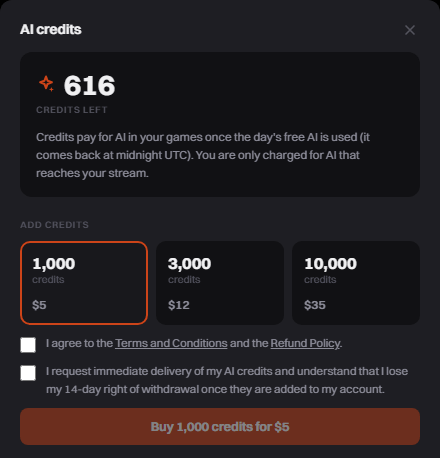
Pro starts you with 200 credits, once per account. To add more, open AI credits from your profile menu, or press Get credits on the AI bar above the panel footer while an AI game is running.
- Pick a pack: 1,000, 3,000 or 10,000 credits. Each price is shown before you buy.
- Tick the two boxes and click Buy.
- Pay on the checkout page. Your credits are added as soon as the payment clears, usually within a minute.
Choose when a game keeps going
Each AI game has a setting called When the free AI runs out:
| Choice | What happens after the free AI |
|---|---|
| Stop | The game goes back to its ready-made lines. Nothing is spent. This is the default. |
| Keep going | The game keeps using AI and pays with credits. |
AI Host always keeps going, since it has no ready-made answers to fall back on.
Set a daily limit
In AI credits, turn on Limit what AI can spend in a day and set how many credits a day. The day follows your own time zone. When the limit is reached, AI stops spending until your next day starts.
When credits run out
You get a message in the dashboard right away, and the AI usage in Game Info says why it paused.
- Roast Your Photo and Guess Your Future go back to their ready-made lines.
- AI Host takes a short break on stream ("Back in a moment") instead of answering.
Add credits and the AI comes back on its own within a minute.
See where your credits go
- AI credits, Activity lists every pack, gift and spend, one row per stream and AI feature each day.
- Game Info, AI usage shows the free AI used today and the credits this stream has spent.
Try it for free
The AI settings of Roast Your Photo and Guess Your Future have a Try it button that shows what the AI would write. Tries are never charged: 20 a day with Pro, 3 without.
Refunds
Credit purchases follow the Refund Policy.
If you have an OpenAI or Fish Audio account, you can pay them directly for the AI instead, at about a third of the credit price. See Use Your Own AI Keys.